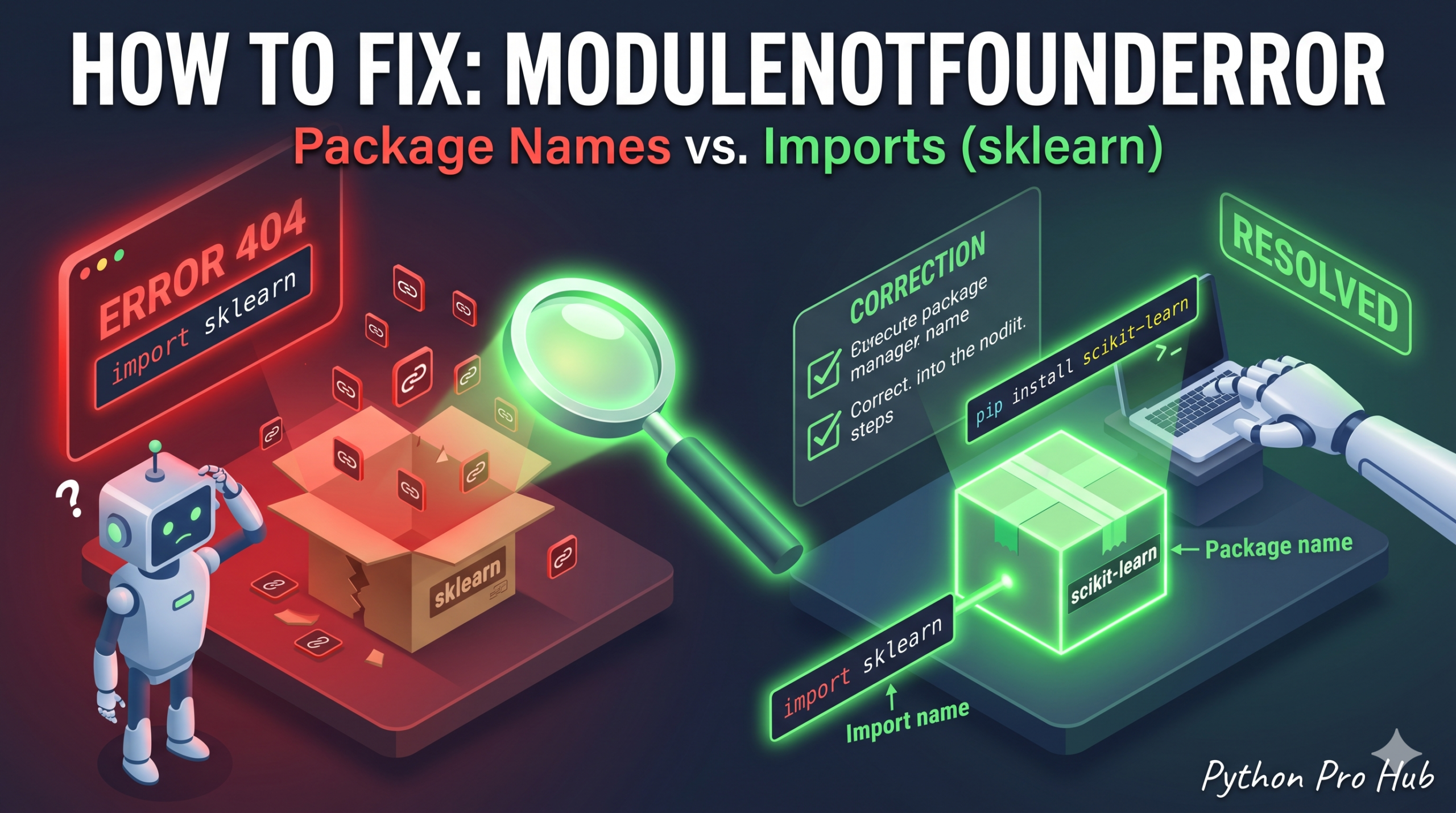
This is one of the most confusing aspects of the Python ecosystem for beginners and veterans alike. The name you use to install a package is NOT always the name you use to import it in your code. Many people encounter errors like ModuleNotFoundError sklearn as a result.
⚡ Quick Fix: ModuleNotFoundError: No module named ‘sklearn’ – Python pip Install Name vs Import Name Mismatch Fix
The install name and the import name are different — running pip install sklearn installs a deprecated dummy package, not the real library.
# Fix — correct install name → correct import name for the Big Five

# pip install scikit-learn  →  import sklearn
# pip install opencv-python →  import cv2
# pip install PyYAML        →  import yaml
# pip install Pillow        →  import PIL
# pip install beautifulsoup4 → import bs4

# Jupyter / Colab: install directly inside the notebook cell
!pip install scikit-learn

# Virtual environment: confirm the active environment first
# then reinstall inside it
pip install scikit-learn
This tells you exactly where your boundary is — now read through the root causes below to find which one broke your code and fix it permanently.
The Cause
You likely ran pip install sklearn, but that specific package is deprecated and acts as an empty dummy package. Or, you ran pip install opencv and then tried to run import opencv in your script.
Quick Tip: If you accidentally ran pip install sklearn, it’s best to remove it to keep your environment clean by running pip uninstall sklearn in your terminal.
The “Big Five” Confusions
1. Scikit-Learn
- Install:
pip install scikit-learn - Import:
import sklearn - Error:
No module named 'sklearn'(Usually means you didn’t install anything, or installed the deprecated ‘sklearn’ dummy package).
2. OpenCV (Computer Vision)
- Install:
pip install opencv-python - Import:
import cv2 - Error:
No module named 'cv2'(Means you forgot to installopencv-python).
3. PyYAML
- Install:
pip install PyYAML - Import:
import yaml - Error:
No module named 'yaml'
4. Pillow (Image Processing)
- Install:
pip install Pillow - Import:
import PIL - Error:
No module named 'PIL'
5. Beautiful Soup 4 (Web Scraping)
- Install:
pip install beautifulsoup4 - Import:
import bs4 - Error:
No module named 'bs4'
How to Check What You Have
If you aren’t sure what is currently installed on your system, open your terminal and run:
pip list
Look for the package name in that list. If you see scikit-learn in the list, you must use import sklearn in your code. If you don’t see it, you need to install it!
The Correct Way to Install and Import
To fix the sklearn error, you need to run two separate steps.
First, in your Terminal / Command Prompt:
pip install scikit-learn
Then, inside your Python Script (.py file):
import sklearn
Still Getting the Error? (Advanced Troubleshooting)
If you ran the install command but your code still throws the ModuleNotFoundError, one of these two things is happening:
1. You are using Jupyter Notebooks or Google Colab Sometimes running pip in your main terminal doesn’t link up with your notebook. Try installing it directly inside a notebook cell by adding an exclamation point or percent sign before the command:
!pip install scikit-learn
# or
%pip install scikit-learn
2. The Virtual Environment Trap You might have successfully installed the package on your computer’s global Python environment, but your code editor (like VS Code or PyCharm) is running a specific isolated Virtual Environment (venv). Make sure your terminal is activated inside the exact same virtual environment that your editor is using to run the code, and then run the pip install command again.
What This Error Exposes About Python’s Package Naming Architecture
ModuleNotFoundError: No module named 'sklearn' exposes a structural gap in Python’s packaging ecosystem: PyPI (the package index) and Python’s import system operate on completely independent namespaces. PyPI uses distribution names — the strings you pass to pip install. Python’s import system uses module names — the strings you pass to import. These two names are set independently by the package author and have no enforced relationship. scikit-learn, opencv-python, Pillow, and beautifulsoup4 are all distribution names that map to entirely different module names at import time.
The deprecated sklearn dummy package on PyPI compounds the confusion. Running pip install sklearn succeeds silently — pip reports a successful install, the package appears in pip list, and nothing signals that the real scikit-learn library is still absent. The crash only arrives at import sklearn inside the script. The fix is two steps: pip uninstall sklearn to remove the dummy, followed by pip install scikit-learn to install the real library.
The virtual environment trap is the most persistent advanced failure mode. A global pip install lands in the system Python’s site-packages directory. VS Code, PyCharm, and Jupyter each maintain their own interpreter references — if your editor points at a virtual environment, packages installed globally are invisible to it. The diagnostic that resolves this immediately: run which python and which pip in your terminal and confirm both paths point into the same environment your editor uses. For Jupyter specifically, %pip install routes the install through the active kernel’s environment rather than the system Python, eliminating the mismatch entirely.